If you've ever sat down to fill in your CCDFSM — your Digital SFBB — you'll know the feeling.
You open the first section. Cross-contamination practices. You know exactly what you do. Raw meat on the bottom shelf, colour-coded boards, handwashing before handling cooked food. But turning that into professional, EHO-ready written procedures? That takes time, careful wording, and a level of formal writing most busy kitchen owners can't afford to spend hours on.
Now multiply that by 13 sections.
And that's before you've stopped to wonder: "Are we actually doing all of this consistently?"
That's why we built Alice.
What is Alice AI?
**Alice AI is CompliChef's built-in AI assistant for UK food businesses.** She is not a general chatbot. She is a food safety and operations AI, powered by **Anthropic Claude**, built specifically for restaurants, takeaways, care homes, pubs, cafés, and any business regulated under UK food safety law.She does three things:
- AI Compliance Audit — reads your actual KitchenPortal log data, scores your compliance, and tells you exactly where you're falling behind
- CCDFSM Builder — generates your complete 13-section food safety management system through a guided 12-question interview
- AI Rota Assistant — reads your staff's contracted hours and availability and analyses your rota for gaps, risk days, and WTR concerns
Alice lives inside your CompliChef account. She is a professional compliance and scheduling tool, not a customer support widget.
Feature 1: AI Compliance Audit
This is Alice's newest capability — and for many kitchens, the most immediately useful.
What it does
Alice looks at your actual log data — probe temperature records, fridge checks, cleaning completions, hot holding logs, checklists, daily diary entries, delivery records, cooldown and reheating records, and probe calibrations — and works out how consistently you've been completing them against what you said you'd do.
The result is a compliance score (0–100%) with a full breakdown by module, a daily trend chart showing where your compliance has dipped over time, and a table of specific missing or incomplete logs.
How it works
Before Alice can audit you, she asks a few questions about how your kitchen operates — your open days, trading hours, how many probe and fridge checks you do per day, whether you run hot holding, checklists, a daily diary, take deliveries, and how often you calibrate your probes. This takes about two minutes.
Once your profile is set, you choose a date range (7 days, 14 days, 30 days, or custom) and Alice fetches your records and runs the audit. You get:
- An overall compliance % score — calculated from expected vs actual completions across all daily modules
- Per-module progress bars — probe temps, fridge checks, cleaning, hot holding, checklists, and daily diary, each with their own expected/actual count and colour-coded status
- Activity modules — deliveries received, cooldown records, reheating records, and probe calibrations logged over the period, shown as totals
- A daily trend chart — showing your compliance % day by day so you can see patterns and spot the days where things slipped
- A missing logs table — the specific dates and modules where records weren't completed, so your team knows exactly what needs attention
Why this matters for EHO inspections
When an EHO officer arrives, they don't just want to see that you have a food safety management system — they want evidence that you're actually following it. Every day. Consistently.
Before Alice's Audit, the only way to know if your team had been completing all their checks was to manually review weeks of log entries. Now Alice does it in seconds and gives you a report you can act on — or show to an inspector as evidence of your own internal auditing.
A consistent record of high compliance scores, and the corrective actions you've taken when scores have dipped, is exactly the kind of proactive food safety management that impresses an EHO and supports a 5-star Food Hygiene Rating.
Feature 2: CCDFSM Builder
How the interview works
When you open Alice in KitchenPortal, she gets straight to business. She works through your kitchen's food safety practices one area at a time, asking clear, plain-English questions:
- Business type and food service — what kind of operation you run and roughly how many covers or meals you serve
- Kitchen setup and food types — your prep environment and the types of food you handle
- Raw and ready-to-eat separation — how you prevent cross-contamination
- Refrigeration, chilling and date-labelling — your cold chain practices
- Cooking methods and temperature verification — how you ensure food is cooked safely
- Daily and deep cleaning — your routines, chemicals and frequencies
- COSHH storage and PPE — how you handle and store cleaning chemicals safely
- Staff food hygiene training and illness policies — qualifications, handwashing, return-to-work
- Allergen management — how you identify, label and communicate allergen information
- Food suppliers and delivery inspection — your approved supplier list and intake checks
- Pest control — your contractor, visit frequency and prevention measures
- Temperature monitoring equipment — your probes, calibration and action points
- Opening and closing checks — your daily management routines
- Complaints and corrective actions — how you handle incidents and food complaints
Your answers don't need to be formal. "We use colour-coded boards and raw meat always goes on the bottom shelf" is a perfectly good answer. Alice takes what you tell her and expands it into polished, professionally worded procedures — in the first-person business voice that EHOs expect to read.
What she generates
After 12 to 15 exchanges, Alice produces all 13 sections simultaneously:
| Section | What Alice writes | |---|---| | Cross-Contamination | Raw storage, equipment, prep separation, staff hygiene, allergen controls | | Cleaning | Daily cleaning, deep cleaning, chemical use, verification | | COSHH | Chemical storage, data sheets, dilution, PPE, staff training | | Chilling | Fridge rules, cooling procedures, defrosting, date labelling | | Cooking | Cooking temperatures, reheating, hot holding, verification | | Management | Opening/closing checks, diary reviews, complaints, pest and maintenance | | HACCP Plan | Scope, key steps, monitoring, corrective actions | | Staff Hygiene | Training, uniforms, illness reporting, handwashing policy | | Deliveries & Suppliers | Approved suppliers, delivery checks, returns, traceability | | Temperature Monitoring | Routine checks, probe use, calibration, failure actions | | Pest Control | Contractor details, prevention measures, staff reporting, monitoring | | Allergen Management | Allergen system, information provision, training, cross-contamination prevention | | Staff Training Policies | Induction, ongoing training, records, supervision, documentation |
Every section is written in 2–4 professional sentences tailored to what you told Alice. Where you didn't provide a specific detail, she applies a sensible, compliant UK-standard default.
The result reads as if it was written by a food safety consultant — because the underlying knowledge driving it was trained on exactly that kind of expertise.
Is the output really EHO-ready?
Yes — with the caveat that you should always review what Alice generates and make sure it accurately reflects your actual practices.
Alice writes in the standard format that EHOs recognise: first-person business voice ("We store all raw meats..."), clear reference to UK food safety requirements, and logical structure across all the areas an inspector will expect to examine. The sections map directly to the FSA's Safer Food Better Business guidance structure.
After the CCDFSM is generated
A single button — "Apply to My CCDFSM" — populates every section of your KitchenPortal CCDFSM instantly. You'll see your live compliance score update as the sections are filled in.
From there you can review and edit any section, mark them complete to track your score, and export your full CCDFSM as a PDF any time — ready to hand to an EHO, a landlord, or any client who asks for your food safety documentation.
Your CCDFSM becomes a living document. As your kitchen changes — new menu, new supplier, new staff — you can re-run the interview or update individual sections at any time. Unlimited re-runs are included.
Feature 3: AI Rota Assistant
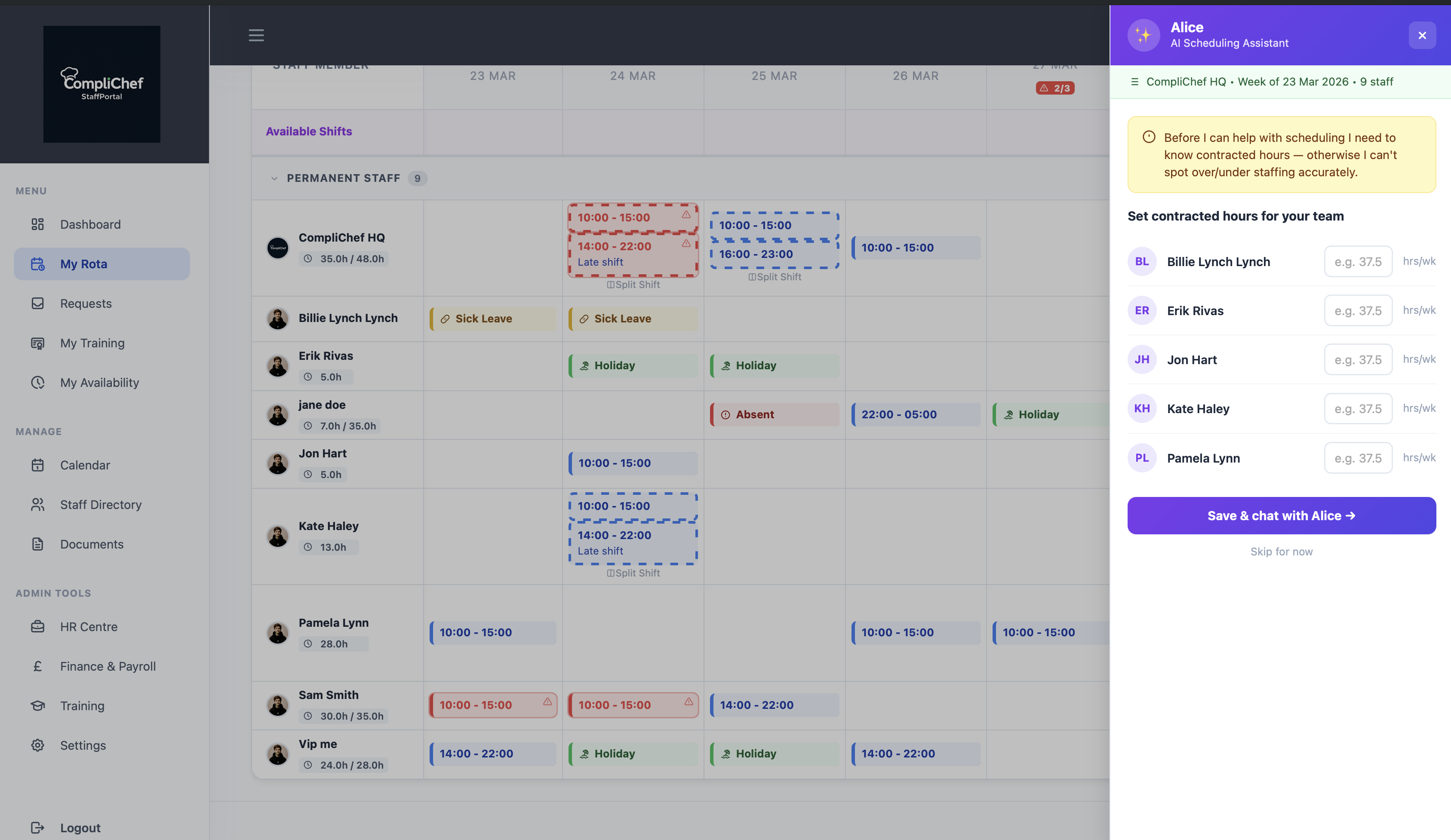
Alice doesn't just handle compliance — she's also built into StaffPortal's rota page as a scheduling assistant.
Rather than replacing the rota builder, Alice reads your live rota — contracted hours, availability declarations, sick leave, and holidays — and tells you what it sees.
Ask her anything:
- "Are there any understaffed days this week?" — Alice identifies days where total scheduled hours fall below your typical cover, or where too many staff are absent at once
- "Who's close to the 48-hour WTR limit?" — Alice flags anyone at risk of breaching the Working Time Regulations weekly limit
- "Can you spot any gaps?" — Alice gives you a plain-English summary of your rota's weak points with enough context to act on
- "Who can cover Saturday if Billie calls in sick?" — Alice looks at availability and contracted hours to suggest realistic options
Quick-action buttons mean your managers can check the most common rota concerns without typing a single word.
Alice doesn't auto-publish shifts. She advises. You confirm. This keeps the manager in control while cutting the time it takes to review and stress-test a week's rota from 45 minutes to a few seconds.
Why Alice instead of a consultant?
Food safety consultants exist for a good reason — translating everyday kitchen practices into formal, compliant documentation is genuinely difficult. A consultant visit to produce your CCDFSM typically costs £100–£500. An audit visit to review your records and flag gaps costs more.
Alice does both jobs for £19/month.
And unlike a consultant's report that sits in a folder, Alice feeds back into your live KitchenPortal records — your CCDFSM is always up to date, and your audit history is always there.
How do I access Alice?
Alice is available in three places inside your CompliChef account:
- AI Audit — in KitchenPortal under the Alice AI section. Set up your kitchen profile, choose a date range, and run your audit
- CCDFSM Builder — on the CCDFSM page in KitchenPortal, look for the "Generate with Alice" card
- Rota Assistant — on the Rota page in StaffPortal, look for the Alice panel on the right-hand side
Alice is an add-on to any CompliChef plan at £19/month. That unlocks all three features — unlimited compliance audits, unlimited CCDFSM re-runs, and the full AI rota assistant. There's no one-time fee and no usage cap.
Want to see the full picture? Visit complichef.co.uk/alice for a complete breakdown of everything Alice can do.
A word on GDPR and data privacy
Because Alice's audit and interview cover details about how you run your food business, we ask for a simple data processing consent before the session begins. This covers how CompliChef uses your data in line with UK GDPR. The consent takes a single click and is stored against your account.
Your conversation and log data is used only to generate your audit report and CCDFSM. We do not use it to train AI models. Your kitchen's information stays in your account.
The bottom line
Your CCDFSM is one of the most important documents your food business has. Your compliance records are the proof that you follow it. Your rota determines whether your team can actually deliver safe food every day.
Alice handles all three — inside your existing CompliChef account.
**Audit your records. Generate your CCDFSM. Analyse your rota. All in one AI add-on.**If you're already on CompliChef, head to KitchenPortal and look for Alice. If you're not yet a customer, get started at portal.complichef.co.uk and add Alice to your plan from day one.
*Alice AI is a £19/month add-on for CompliChef KitchenPortal and StaffPortal accounts. Powered by Anthropic Claude — the same AI technology trusted by enterprises worldwide. Includes unlimited compliance audits, unlimited CCDFSM generations, and full AI rota assistance for UK food businesses.*